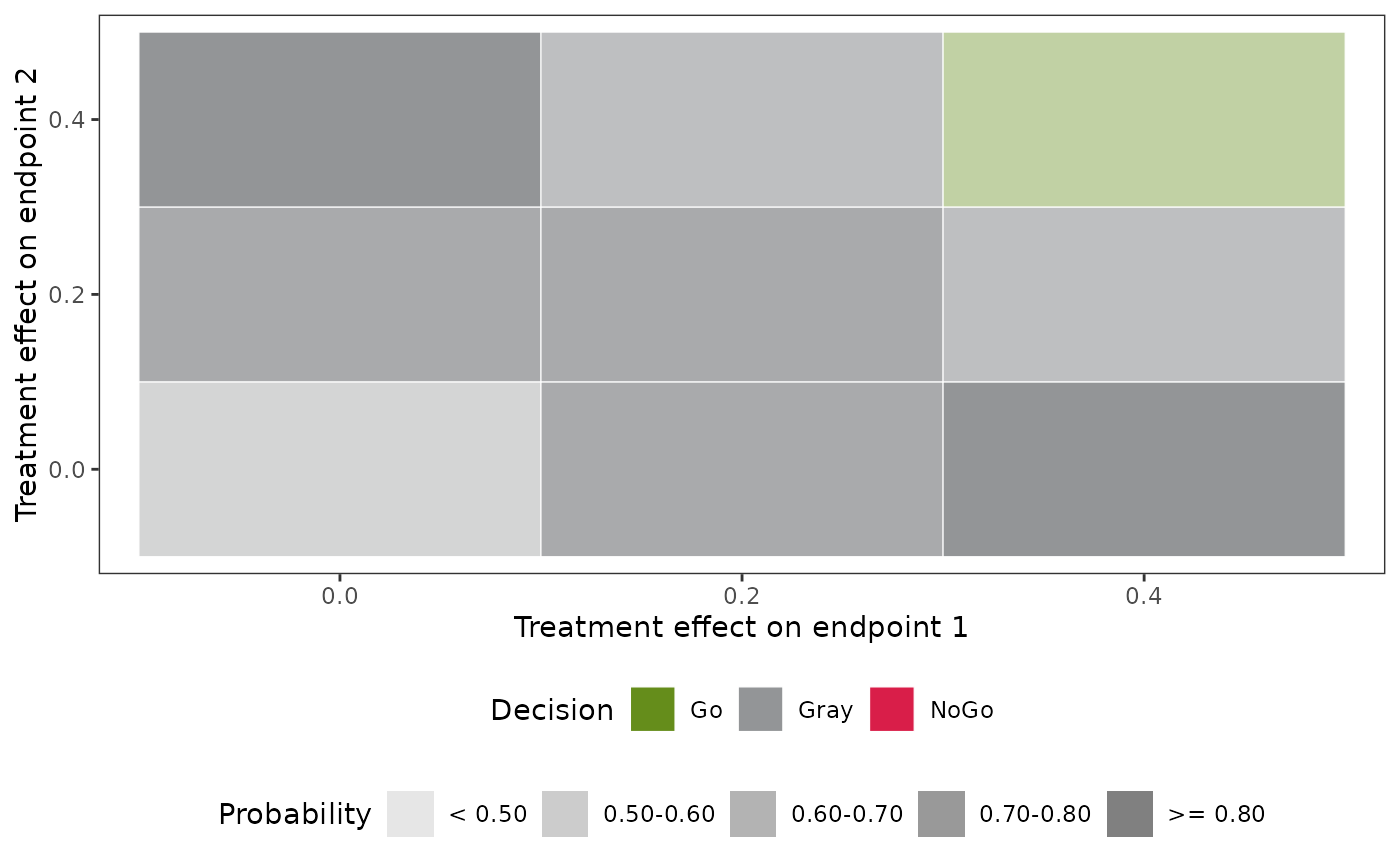
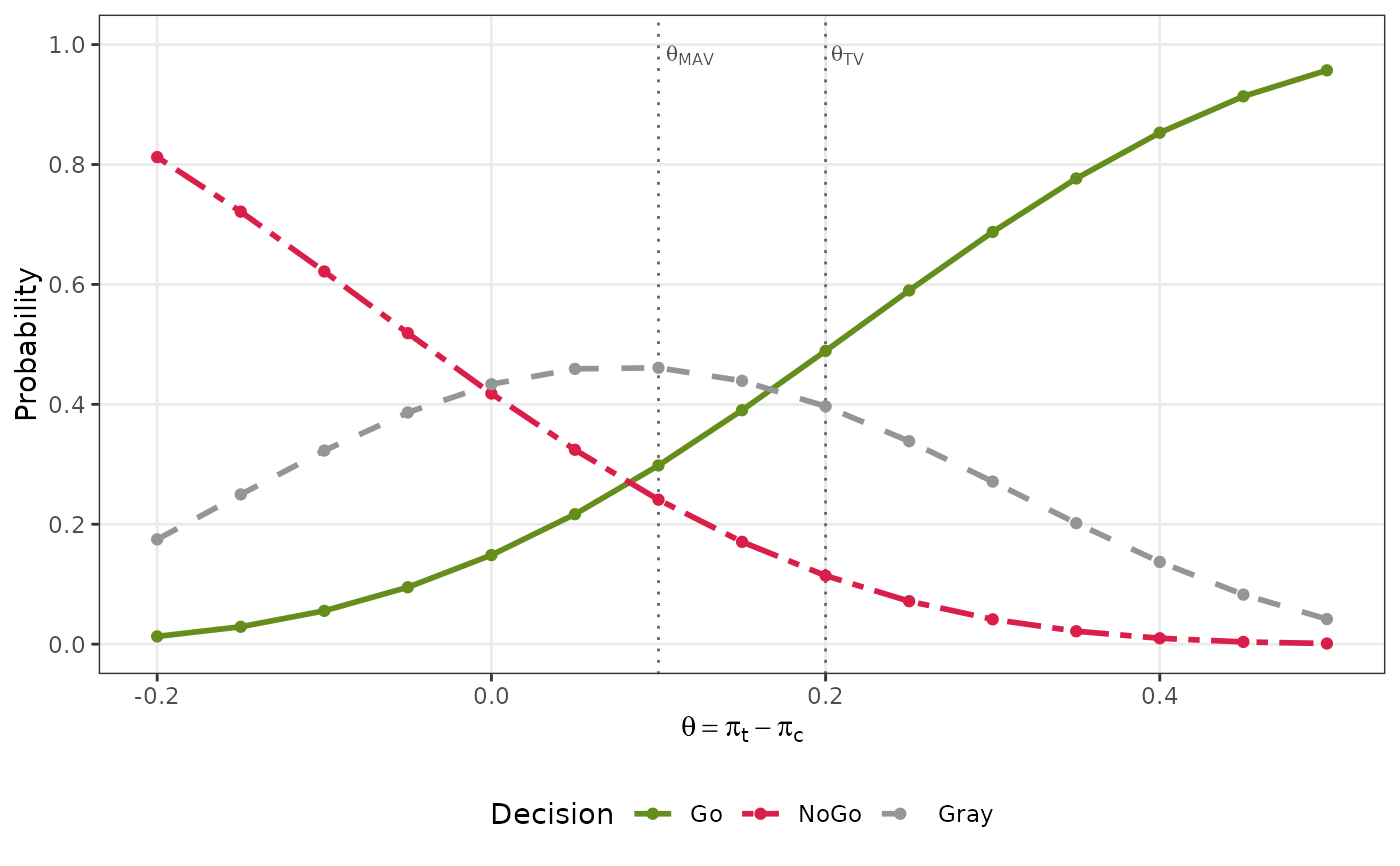
Draws the probabilities of Go, NoGo and Gray decisions (and Miss decisions if they have positive probability) against the true treatment effect of the scenarios. For a time-to-event endpoint, the effect is the difference of the milestone survival probabilities \(\exp(-\log(2) t_0 / m)\) given by the median survival times \(m\) of the scenarios. For a design without a concurrent control group, the horizontal axis is the true response rate (binary endpoint), mean (continuous endpoint) or milestone survival probability (time-to-event endpoint) of the treatment group, and the thresholds of the criterion are shifted by the fixed control value, or otherwise by the mean (binary and time-to-event) or location (continuous) of the distribution of the control group. The scenarios must have distinct values on the horizontal axis, so scenarios with the same effect (for example, with several standard deviations or control parameters) are plotted separately.
Usage
# S3 method for class 'qdm_oc'
plot(
  x,
  col_go = "#658D1B",
  col_nogo = "#D91E49",
  col_gray = "#939597",
  col_miss = "#E69F00",
  linewidth = 1,
  point_size = 1.5,
  label_size = NULL,
  base_size = 11,
  legend_position = "bottom",
  overlay = FALSE,
  cell_values = TRUE,
  ...
)
Arguments
- x
An object of class
"qdm_oc".- col_go, col_nogo, col_gray, col_miss
Colors of the Go, NoGo, Gray and Miss decisions: color names or hexadecimal codes. The defaults are green, red, gray and orange. Transparency (an alpha value in the code) is not used in the heat maps.
- linewidth
Width of the curves, in the units of the
linewidthaesthetic of ggplot2.- point_size
Size of the points, in millimeters.
- label_size
Size of the text drawn in the plot, in millimeters: the labels of the thresholds, or the probabilities in the cells of the heat maps.
NULL(the default) gives the size of the axis tick labels,0.8 * base_size / ggplot2::.pt.- base_size
Base font size of
ggplot2::theme_bw(), in points, which sets the size of the axis labels, tick labels, legend and caption.- legend_position
Position of the legend:
"bottom"(the default),"top","left","right"or"none". To place the legend inside the plot, addggplot2::theme().- overlay
Two endpoints only:
FALSE(the default) for one heat map per decision, orTRUEfor a single heat map of the decision with the highest probability in each cell.- cell_values
Two endpoints only:
TRUE(the default) to write the probabilities in the cells of the heat maps (withoverlay = TRUE, the probability of the decision shown), orFALSEto leave them out. Scenarios that are not evaluable are marked "NE" in either case. The probabilities are rounded to two decimals, so a probability just below a step of the overlay (for example 0.499) is written as the value of the step (0.50) in a cell of the lower step.- ...
Not used; arguments given here are ignored with a warning.
Details
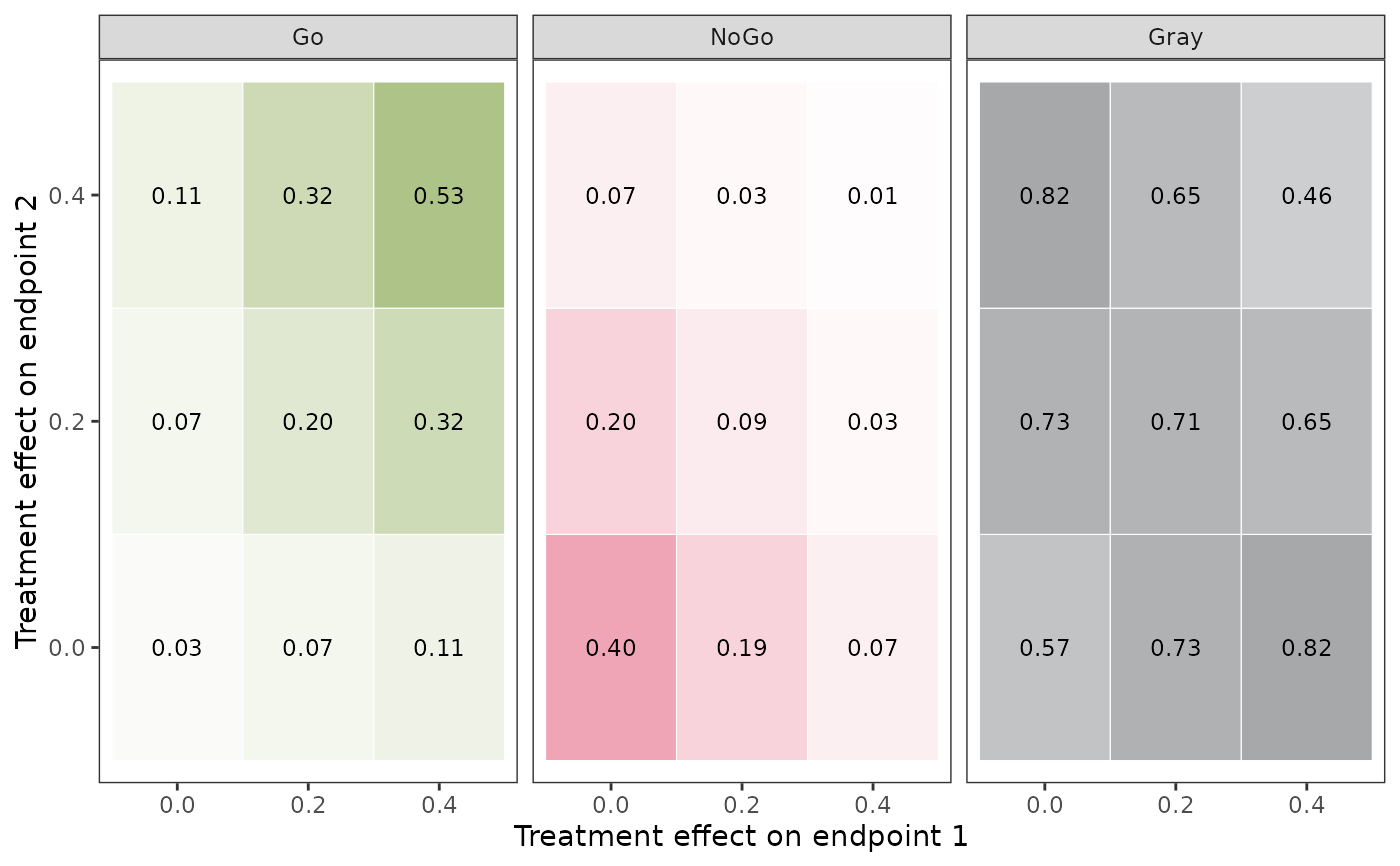
For two endpoints, the plot has one heat map per decision, with the true
treatment effects of the two endpoints (or the true parameters of the
treatment group without a concurrent control group) on the axes and the
probability of the decision in each cell; scenarios that are not evaluable
are marked "NE". The scenarios must have distinct values on the axes, so
scenarios with several correlations (or several parameters of the control
group) are plotted separately. Each panel is shaded from white
(probability 0) to the color of its decision (probability 1); the heat maps
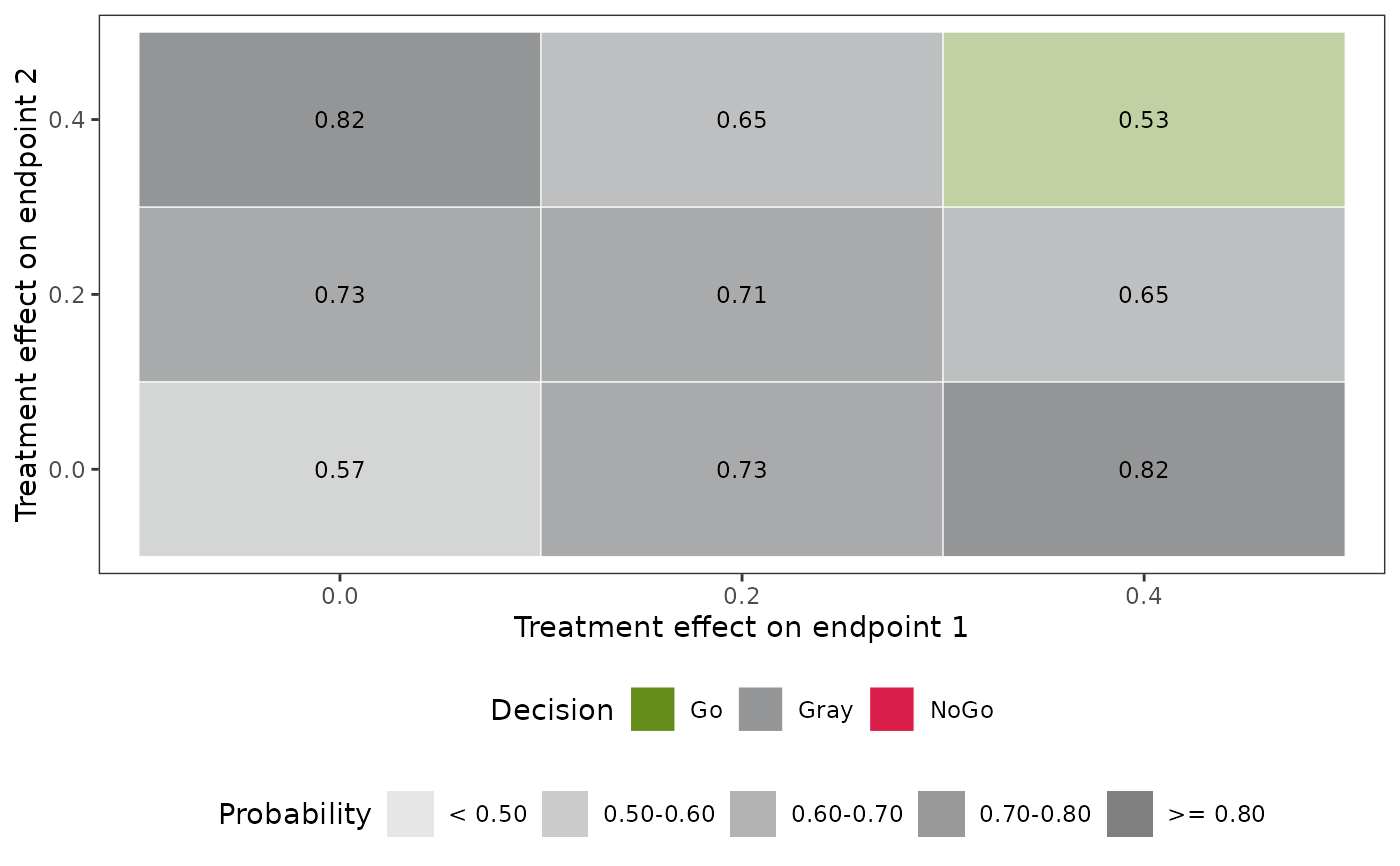
have no legend. With overlay = TRUE, a single heat map is drawn
instead: each cell has the color of the decision with the highest
probability (Go, Gray or NoGo, or Miss if it occurs; ties go to the first
in this order), shaded in five steps of that probability (below 0.5, 0.5
to 0.6, 0.6 to 0.7, 0.7 to 0.8, and 0.8 or more), with legends for the
decisions and the steps (shown in gray whatever the colors of the
decisions), as in the heat maps of Yamaguchi et al. (submitted,
Figure 2).
The plot is a ggplot object, so it can be changed further by adding
ggplot2 functions, for example ggplot2::labs() for the title
and the axis labels, ggplot2::theme() for the text and the legend,
and ggplot2::scale_colour_manual() or
ggplot2::scale_linetype_manual() for the curves of one endpoint.
The colors of the heat maps are set by the color arguments.
References
Yamaguchi, Y., Hu, H., Huang, Y., Han, C., Homma, G. and Wang, A. (submitted). Bivariate Bayesian quantitative decision-making for two endpoints in rare disease drug development.
Examples
des <- design_binary(
n_t = 12, n_c = 12,
prior_t = prior_beta(0.5, 0.5), prior_c = prior_beta(0.5, 0.5),
criterion = criterion_posterior(theta_tv = 0.2, theta_mav = 0.1,
gamma_go = 0.5, gamma_nogo = 0.8)
)
oc <- qdm_oc(des, data.frame(pi_t = seq(0.2, 0.9, by = 0.05), pi_c = 0.4))
plot(oc)
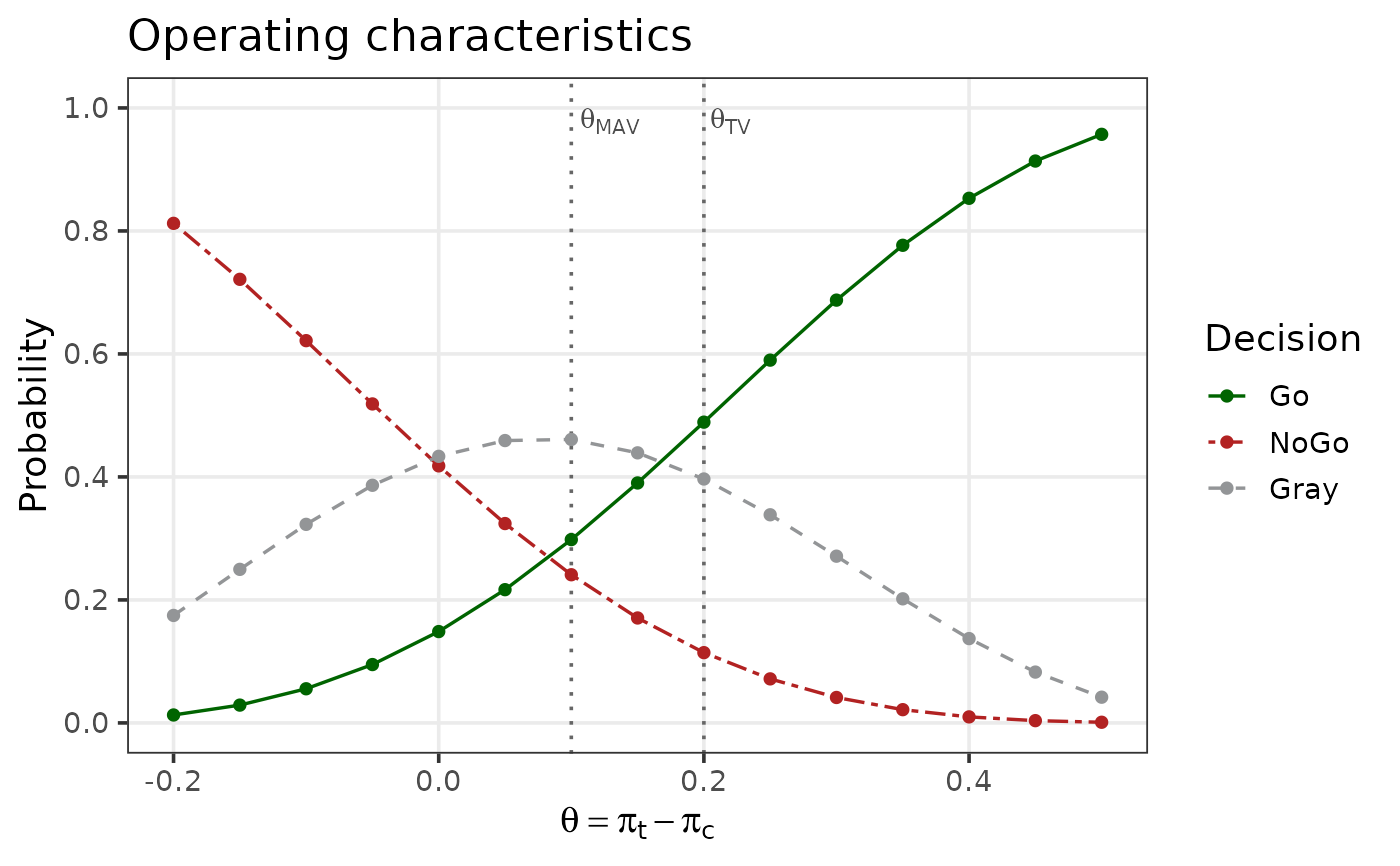
 # Other colors, thinner lines, larger text and the legend on the right,
# with a title added by ggplot2
plot(oc, col_go = "darkgreen", col_nogo = "firebrick", linewidth = 0.6,
base_size = 14, legend_position = "right") +
ggplot2::labs(title = "Operating characteristics")
# Other colors, thinner lines, larger text and the legend on the right,
# with a title added by ggplot2
plot(oc, col_go = "darkgreen", col_nogo = "firebrick", linewidth = 0.6,
base_size = 14, legend_position = "right") +
ggplot2::labs(title = "Operating characteristics")
 # Two binary endpoints: one heat map per decision, or a single heat map
# of the decision with the highest probability in each cell
prior <- prior_dirichlet(rep(0.25, 4))
des2 <- design_binary2(
n_t = 6, n_c = 6, prior_t = prior, prior_c = prior,
criterion = criterion_posterior(theta_tv = c(0.15, 0.15),
theta_mav = c(0.1, 0.1),
gamma_go = 0.6, gamma_nogo = 0.6),
nMC = 500
)
eff <- expand.grid(theta1 = c(0, 0.2, 0.4), theta2 = c(0, 0.2, 0.4))
oc2 <- qdm_oc(des2, data.frame(pi_t1 = 0.2 + eff$theta1,
pi_t2 = 0.2 + eff$theta2, rho_t = 0.3,
pi_c1 = 0.2, pi_c2 = 0.2, rho_c = 0.3),
seed = 1)
plot(oc2)
# Two binary endpoints: one heat map per decision, or a single heat map
# of the decision with the highest probability in each cell
prior <- prior_dirichlet(rep(0.25, 4))
des2 <- design_binary2(
n_t = 6, n_c = 6, prior_t = prior, prior_c = prior,
criterion = criterion_posterior(theta_tv = c(0.15, 0.15),
theta_mav = c(0.1, 0.1),
gamma_go = 0.6, gamma_nogo = 0.6),
nMC = 500
)
eff <- expand.grid(theta1 = c(0, 0.2, 0.4), theta2 = c(0, 0.2, 0.4))
oc2 <- qdm_oc(des2, data.frame(pi_t1 = 0.2 + eff$theta1,
pi_t2 = 0.2 + eff$theta2, rho_t = 0.3,
pi_c1 = 0.2, pi_c2 = 0.2, rho_c = 0.3),
seed = 1)
plot(oc2)
 plot(oc2, overlay = TRUE)
 plot(oc2, overlay = TRUE, cell_values = FALSE)